

Certified Zoom Rooms Devicesfor Enterprises in Pakistan
Enterprise conference rooms need hardware that delivers consistent audio and video, not last-minute troubleshooting. Capstar Solutions supplies and deploys certified Zoom Rooms devices across Pakistan — from compact huddle bars to dual-camera boardroom systems.


Zoom Rooms Hardware for Every Room Size
A Zoom Rooms deployment depends on matching the right hardware to your room dimensions, seating capacity, and meeting patterns. Certified devices fall into four tiers. Select the size that best fits your space and review the recommended devices below.
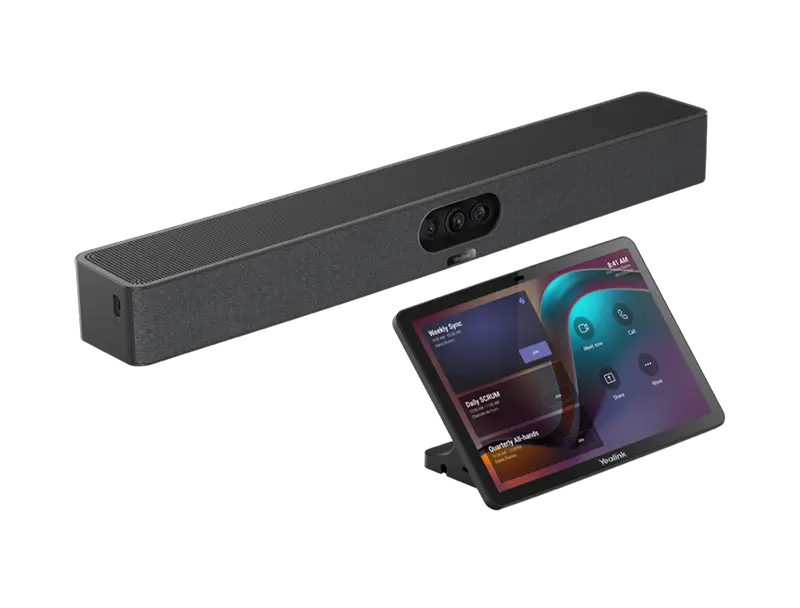
Compact All-in-One Bars
Single-unit devices combining camera, microphone, and speaker. Budget-friendly, minimal cabling, and fast to install in small meeting spaces
Yealink A20
Logitech Rally Bar Mini
Poly Studio X30 / R30
Jabra PanaCast 40 VBA
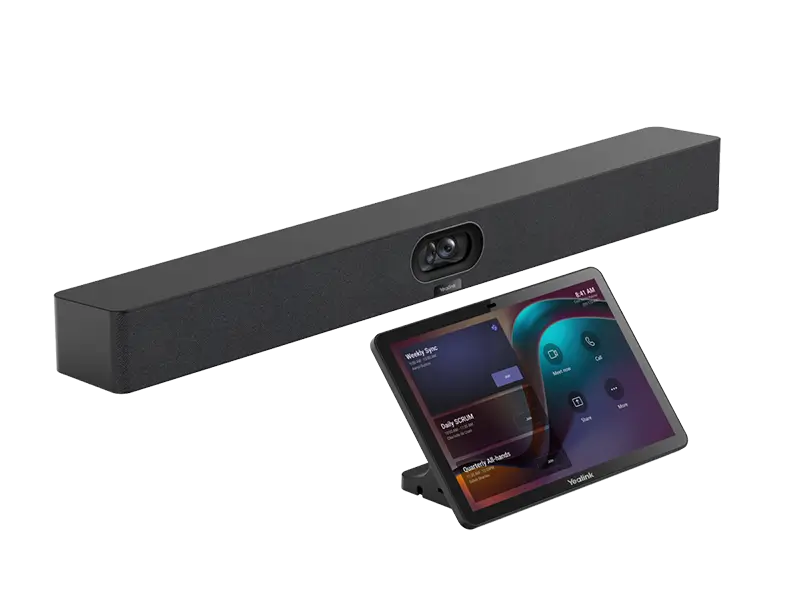
Mid-Range Bar Systems
4K PTZ cameras with AI auto-framing and extended microphone coverage for standard conference rooms used daily by rotating teams.
Yealink A40
Logitech Rally Bar
Poly Studio X52
Neat Bar Pro
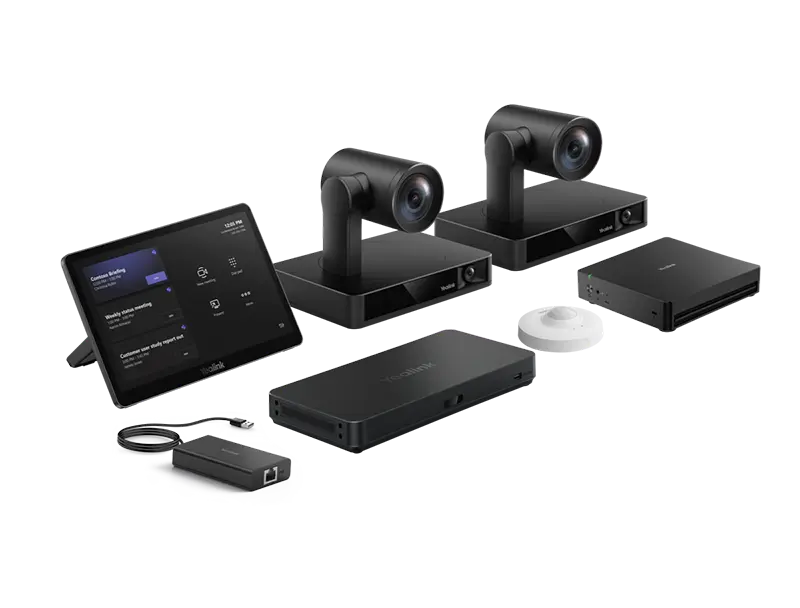
Flagship Boardroom Systems
Dual-camera setups, ceiling microphone arrays, and PTZ control for executive boardrooms and training rooms at full enterprise scale.
Yealink MVC S90
Logitech Rally Plus
Poly Studio X72
Neat Board Pro
Poly Zoom Rooms Devices for Pakistan
HP Poly offers two approaches to Zoom Rooms deployment: the Studio X series runs Zoom Rooms natively as a self-contained appliance with no external PC, while the Poly Studio Base Room Kit pairs an HP Mini Conferencing PC and TC10 touch controller with your choice of V-series video bar or E-series camera for organizations requiring Windows-based management and maximum configuration flexibility.
All Poly Zoom Rooms hardware ships with DirectorAI camera intelligence, NoiseBlockAI microphone processing, and Acoustic Fence technology — ensuring consistent audio and video quality whether your rooms seat 4 or 30 participants.


Yealink Zoom Rooms Devices for Pakistan
Yealink’s MeetingBar series and MVC room systems deliver full-featured Zoom Rooms hardware at Pakistan’s most competitive price points. The A-series bars combine all room components — camera, microphone array, speaker, and Zoom Rooms compute — in a single unit mounting directly above or below the display, with a single cable run to the screen.
AI Face Enhancement automatically corrects poor lighting conditions, so participants in darker offices appear at the same brightness as those in well-lit rooms. Eye Direction Correction aligns the gaze toward the camera when the speaker looks at a side screen, maintaining natural eye contact throughout the call.
Logitech Zoom Rooms Hardware for Pakistan
Logitech’s Rally series pairs 4K PTZ cameras with RightSight 2 AI framing and RightSound audio processing to produce broadcast-quality meetings in any room size. All Rally Bar products integrate with the Logitech Tap IP controller — a wall-mount room display for scheduling, one-touch join, and room management — and the Logitech Sync cloud device management platform for remote monitoring and updates.
RightSight 2 distinguishes between participants entering the room and those seated for a meeting, adjusting the camera field of view and zoom level throughout the session without operator intervention. The 10-speaker soundbar on the Rally Bar delivers full-room audio coverage without additional satellite speakers in rooms up to 22 feet in width.


Neat Zoom Rooms Devices for Pakistan
Neat designs its entire hardware lineup exclusively for Zoom and Microsoft Teams, without attempting to support other platforms. This single-platform focus means Neat devices receive continuous software improvements and deep AI integration — including automated meeting notes capture and real-time space utilization analytics — ahead of multi-platform hardware manufacturers.
The Neat Pad 10-inch room controller doubles as a space booking system that displays room availability, meeting titles, and remaining meeting time on the outside of any door. Wireless screen sharing works without a cable or application install — participants share from any device by scanning a QR code displayed on the room screen.
Jabra Zoom Certified Devices for Pakistan
Jabra’s PanaCast line delivers 180-degree panoramic video coverage — capturing the full width of a room without distortion — making it the practical choice for spaces where wall-to-wall participant visibility matters. The PanaCast 50 Video Bar System and PanaCast 40 VBS are complete Zoom Rooms appliances running Android, while the PanaCast 50 USB camera functions as a peripheral for existing Zoom Rooms compute devices.
Dual-stream whiteboard mode broadcasts the room and the physical whiteboard simultaneously as two independent video streams, so remote participants see the board in full resolution without it replacing the speaker view. All PanaCast devices integrate with Zoom Device Management (ZDM), giving IT administrators remote control over firmware updates and configuration from the Zoom admin portal without on-site visits.

DTEN Zoom Rooms Devices for Pakistan
DTEN builds purpose-built Zoom Rooms appliances for personal workspaces and small huddle rooms. Every DTEN device runs Zoom Rooms natively without an external compute unit, includes an integrated touchscreen for whiteboard collaboration, and ships with an 8-element microphone array engineered for high-clarity close-range audio. DTEN suits organizations equipping individual hot desks, focus rooms, and reception screens alongside their larger conference room deployments.
Choosing the Right Zoom Rooms Device for Your Space
Match your room dimensions and seat count to the correct hardware tier. A device undersized for your room leaves remote participants unable to see or hear everyone clearly. Oversizing wastes budget on audio coverage the room does not require.
Room Type
Room Size
Zoom Room Device
Camera Coverage
Audio Range
Seats
Personal / Desk
1 User
DTEN ME · Neat Bar BYOD · Jabra PanaCast 20
4K AI · 120° FOV
Desktop Range
1
Huddle Room
Up to 15ft × 10ft
Yealink A20 · Logitech Rally Bar Mini · Poly Studio X30 · Jabra PanaCast 40 VBS · DTEN D7
120–180° FOV
Up to 15 ft
2 – 6
Medium Conference
Up to 22ft × 15ft
Yealink A30 / A40 · Logitech Rally Bar · Poly Studio X52 / V52 · Neat Bar Pro · Jabra PanaCast 50 VBS
90–120° FOV
Up to 20 ft
6 – 12
Large Boardroom
25ft+ spaces
Yealink A50 / MVC960 · Logitech Rally Plus · Poly Studio X72 / V72 / E60 / E70 · Neat Board Pro
70°+ with PTZ
25–30+ ft
12 – 25+
Not sure which device fits your room? Our team assesses your floor plan, seating layout, and network before recommending hardware.
The Authorized Partner for Zoom Rooms Devices in Pakistan
Buying certified hardware from an authorized Zoom partner guarantees genuine licensing, manufacturer warranty support, and local deployment expertise. Capstar Solutions has completed 220+ enterprise deployments since 2014 across Islamabad, Lahore, and Karachi, with direct access to Zoom’s partner support channel for escalations.
Authorized Supply Chain
Capstar Solutions procures every Zoom Rooms device through authorized distributor channels. Your hardware ships with a valid manufacturer warranty and full Zoom licensing — not grey-market imports with voided support agreements or expired software keys. Verify any device model on the Zoom certified hardware marketplace ↗ before finalizing procurement.
End-to-End Deployment
Capstar Solutions handles supply, physical installation, Zoom Rooms configuration, network testing, and user training as a single engagement. Your IT team does not coordinate separately with a hardware vendor, a software partner, and a cabling contractor.
Room Design Before Procurement
Our team assesses your room dimensions, ceiling height, seating layout, and network infrastructure before recommending hardware. This prevents mismatched installations, where the wrong device is installed in a room and must be replaced before the project closes.
Local Support Across Pakistan
On-site engineers cover Islamabad, Lahore, and Karachi for installation, troubleshooting, and warranty support. Remote configuration handles issues in other cities without requiring travel delays before a fix reaches your room.
FAQs
Zoom Rooms Devices in Pakistan — Common Questions
Answers to the questions Pakistan IT managers ask most often before selecting and deploying certified Zoom Rooms hardware for their organizations.
What hardware do I need to set up Zoom Rooms in Pakistan?
A Zoom Rooms deployment requires three components: a certified camera and audio device such as a Yealink MeetingBar A30, Logitech Rally Bar, or Poly Studio X52; a Zoom Rooms Controller tablet for in-room control; and a Zoom Rooms license from Zoom. Most modern all-in-one bars include the compute unit inside the device, so no separate Windows PC is required. Capstar Solutions supplies all three components, handles room configuration, and provides on-site testing in Islamabad, Lahore, and Karachi.
Which Zoom Rooms device is best for a small huddle room in Pakistan?
For huddle rooms seating 2 to 6 people, the most practical options are the Yealink MeetingBar A20, Logitech Rally Bar Mini, Poly Studio X30, and Jabra PanaCast 40 VBS. All four fit in rooms under 15 feet and combine a camera, microphones, and a speaker into a single bar unit, requiring minimal cabling. Capstar recommends the Yealink A20 as the most budget-conscious starting point, and the Logitech Rally Bar Mini for organizations that require advanced RightSight 2 AI auto-framing and Sync device management.
Is Poly Studio X compatible with Zoom Rooms in Pakistan?
Yes. The current Poly Studio X series — Studio X30, Studio X52, and Studio X72 — carries official Zoom Rooms certification. Each unit runs Zoom Rooms natively on its built-in Android OS and requires no separate Windows compute device. HP Poly also offers a PC-based path: the Poly Studio Base Room Kit (HP Mini Conferencing PC plus TC10 controller) pairs with V-series video bars (V12, V52, V72) or E-series cameras (E60 PTZ, E70 dual smart camera) for organizations needing Windows management. Capstar Solutions supplies, configures, and supports the full Poly Zoom Rooms range across Pakistan with on-site deployment in Islamabad, Lahore, and Karachi.
What is the difference between Zoom Rooms and Zoom Meetings?
Zoom Meetings is the software application running on an individual laptop or mobile device,e where each participant joins from their own screen. Zoom Rooms is a dedicated conference room system that combines certified hardware with a shared-room Zoom interface, so anyone in the room can join or start a meeting with a single touch on the room controller, without needing a personal device. Zoom Rooms requires its own license separate from Zoom Meetings and needs certified hardware, such as a Yealink MeetingBar, Poly Studio X, or Logitech Rally Bar, installed in the physical room
Can I use Jabra PanaCast with Zoom Rooms in Pakistan?
Yes. The Jabra PanaCast 50 Video Bar System and PanaCast 40 VBS are fully certified Zoom Rooms appliances that run the Android-based Zoom Rooms OS natively. The PanaCast 50 USB camera also works as a peripheral alongside an existing Zoom Rooms Windows or Android compute device. All PanaCast devices integrate with Zoom Device Management (ZDM), which allows IT administrators to push firmware updates, adjust device settings, and view diagnostic information from the Zoom admin portal remotely without sending an engineer on-site for routine maintenance tasks.
How much does Zoom Rooms hardware cost in Pakistan?
Zoom Rooms hardware pricing in Pakistan depends on room size and the vendor selected. Entry-level bars such as the Yealink MeetingBar A20 start at approximately PKR 195,000 per room. Mid-range solutions like the Logitech Rally Bar or Yealink MeetingBar A40 range from PKR 380,000 to PKR 620,000 per room. Flagship boardroom systems with dual PTZ cameras and extended microphone coverage start above PKR 850,000. All prices cover the hardware device and Zoom Rooms Controller tablet. Capstar Solutions provides itemized quotes including hardware, Zoom Rooms licensing, on-site installation, and one year of local support. Contact us for current pricing and volume discounts on deployments covering five or more rooms.
Ready to Deploy Zoom Rooms Across Your Organization?
Contact Capstar Solutions for a free technical consultation and product demonstration. We design the right Zoom setup for your room sizes, user count, and carrier requirements — and we handle every step from licensing through go-live.
Request a Quote
The more detail you share, the more accurate our proposal.